How to Check When and Where Your Aadhaar Was Used – View Your Own Digital Identity Log
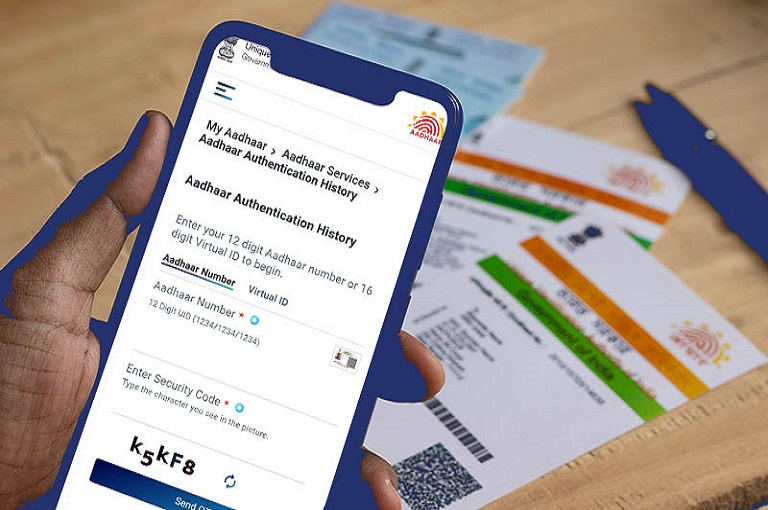
Aadhaar, considered the backbone of India’s digital identity system, has become an essential part of almost every service—from banking to government benefits. Whether it is mobile SIM activation or financial KYC, Aadhaar is required everywhere. With the rapid expansion of Digital India, the use of Aadhaar has also increased, making it important for you to know when and where your Aadhaar was used in the last six months.
The good thing is that UIDAI provides an easy and secure feature that allows you to fully check your Aadhaar authentication history.
This detailed article explains why Aadhaar authentication history is important, how it helps you, and how you can view your Aadhaar usage log within minutes. It also tells you what steps you can take to enhance Aadhaar security so that your digital identity remains strong and safe.
Why Aadhaar Is the Powerhouse of India’s Digital Services
Aadhaar is not just an identity card—it is a universal digital ID. It is the country’s largest biometric identity system, used by hundreds of government and private institutions for secure identification and verification.
Financial institutions, telecom companies, the insurance sector, and government benefit platforms all use Aadhaar-based verification.
Because of this wide usage, it is extremely important to know every authentication request made using your Aadhaar number. This helps you ensure that your Aadhaar is being used only at legitimate places and detect any suspicious attempts.
Why It Is Important to Check Aadhaar Authentication History
Whenever your Aadhaar is used for eKYC, digital signature, government subsidy, or banking processes, a digital record is created. This record is called the authentication log. UIDAI stores this securely and gives you full control to monitor the usage of your Aadhaar number.
Key Benefits of Checking Aadhaar Authentication History
1. Immediate Detection of Suspicious Activity
If any institution tries to verify your Aadhaar without your knowledge, you can spot it instantly. Even failed or repeated attempts may indicate potential risks.
2. Protection from Fake KYC
Many financial frauds begin with fake KYC. The log helps you identify which bank, company, or service provider attempted to use your Aadhaar.
3. Complete Control Over Your Digital Data
Checking your history regularly ensures your Aadhaar is not being misused.
4. Verification of Biometric Security
If you have locked your biometrics, the log helps confirm whether the lock is functioning correctly and no unauthorized biometric request has happened.
5. Opportunity for Timely Action
If any suspicious entry appears, you can immediately lock your biometrics, contact the institution, or file a complaint.
Types of Aadhaar Authentication
Your Aadhaar log shows different types of authentication entries. Understanding them helps you read your log correctly.
Demographic Authentication
Verification of details like name, address, date of birth.
Biometric Authentication
Verification using fingerprint or iris scan.
OTP-based Authentication
Verification using the OTP sent to your registered mobile number.
Other Authentication Types
eKYC, digital signatures, and online verification used in financial services.
The log shows which type of authentication was performed along with the date and time.
What You Need to Check Aadhaar Authentication History
To access your Aadhaar log online, you only need:
1. Aadhaar Number or Virtual ID
You can use either the 12-digit Aadhaar number or the 16-digit Virtual ID.
2. Registered Mobile Number
OTP is sent to your registered number, so you must have access to it.
History cannot be accessed from an unregistered mobile number, ensuring safety.
How to View Aadhaar Authentication History for the Last Six Months
Here is the step-by-step process to view your Aadhaar usage within minutes:
Step 1
Go to the Aadhaar services options and select Authentication History.
Step 2
Enter your Aadhaar number or Virtual ID, then fill in the captcha.
Step 3
Choose the Send OTP option. An OTP will be sent immediately to your registered mobile number.
Step 4
Enter the OTP and continue. You will now access the history page.
Step 5
Choose the time period—up to a maximum of six months.
Step 6
Select the type of authentication. Choose All if you want the complete history.
Step 7
Submit the request. Within seconds, your entire digital usage log will appear.
The log displays the date, time, type of authentication, success or failure status, and details of the requesting institution.

What to Do If You Find an Entry You Don’t Recognize
Sometimes you may see a request from an unknown institution. In such cases, act immediately:
• Contact the concerned service provider
Find out why the request was made.
• Lock Aadhaar biometrics immediately
This provides instant security and blocks further biometric requests.
• Take guidance from the Aadhaar helpline
They can advise you on the next steps.
Powerful Ways to Keep Your Aadhaar Secure
Aadhaar security is essential for your digital safety. These steps provide strong protection:
- Never share your OTP with anyone
- Keep your biometrics locked unless you frequently need them
- Beware of fake websites—enter Aadhaar only on official portals
- Check your authentication history regularly
- Do not share your Aadhaar number publicly
Conclusion
In digital India, Aadhaar is the key to your digital identity. Securing it is vital for your financial transactions, government services, and personal digital safety.
UIDAI’s Aadhaar Authentication History feature empowers you to monitor where your Aadhaar is being used and ensure your identity remains safe.
About The Author