iOS 26 Hidden Features: 5 Game-Changing Updates That Will Transform the Way You Use Your iPhone

Introduction
Every year Apple surprises its users with a brand-new iOS update that improves performance, design, and security. This year, along with the launch of the iPhone 17 series, Apple rolled out its much-anticipated iOS 26 update on September 15.
The update is not just about a refreshed design or minor tweaks. Apple has packed iOS 26 with intelligent, futuristic features that take the iPhone experience to the next level. While many of the big changes are already being talked about, there are also several hidden features tucked away in the update. These features may not have made the headlines, but they are powerful enough to completely change how you use your iPhone.
In this article, we’ll dive into the top 5 hidden features of iOS 26 that you absolutely need to know about.
1. Adaptive Power Mode – Smarter Battery Life Than Ever
Battery life has always been one of the most common concerns for iPhone users. With iOS 26, Apple has finally introduced an intelligent solution to this long-standing issue.
What Is Adaptive Power Mode?
When you head into your iPhone’s battery settings, you’ll now find a new option called Adaptive Power Mode. Once enabled, the system automatically manages your phone’s performance and background activity depending on your usage pattern.
- If you’re playing games, editing videos, or running high-performance apps, the iPhone will prioritize performance.
- If you’re simply texting, browsing, or using light apps, the system dials down performance and conserves energy.
Why It’s a Game-Changer
- Smart energy management without user intervention
- Balanced performance and efficiency tailored to your habits
- Longer battery backup during travel or work hours
Adaptive Power Mode gives you the best of both worlds: strong performance when you need it and extended battery life when you don’t.
2. Face Gesture Control – Control iPhone Without Touch
The most futuristic feature of iOS 26 has to be Face Gesture Control. Apple has taken accessibility to a new level by giving users the power to operate their iPhones with just their face.
How It Works
In the Accessibility settings, you’ll now find two key options: Head Tracking and Face Gestures.
- Head Tracking: Moves a pointer on the screen based on your head’s movement.
- Face Gestures: Allows you to assign actions to gestures like smiling, blinking, or moving your mouth.
Why It’s Powerful
- Life-changing for people with physical disabilities
- Lets you navigate your iPhone without touching the screen
- Adds a futuristic, hands-free experience for all users
This feature doesn’t just make the iPhone more inclusive — it makes it more exciting, proving Apple is serious about merging accessibility with innovation.
3. Spatial Photos and Wallpapers – Bring Your Pictures to Life
Imagine your photos not just sitting still but coming alive in 3D. With iOS 26, Apple has made that possible through the new Spatial Photos feature.
What It Does
Any photo with a bit of depth can be turned into a 3D image. Once enabled, tilting or moving your device gives the photo a dynamic, lifelike effect.
Works With Wallpapers Too
Even better, you can apply Spatial Photos to your lock screen and home screen wallpapers. Every time you unlock your phone, you’ll be greeted by an animated, depth-filled image.
Why You’ll Love It
- Makes memories feel more alive
- Adds a layer of fun and interactivity to your device
- Transforms your iPhone into a visual showcase of your best moments
It’s not just a feature — it’s a whole new way to relive your favorite memories.
4. Custom Ringtones Without iTunes – Finally, Freedom!
One of the longest-standing frustrations for iPhone users has been the complicated process of setting custom ringtones. Until now, it required iTunes or third-party apps. But with iOS 26, Apple has finally simplified it.
How It Works Now
With the new update, you can directly create and set custom ringtones right from Safari. Download a sound, trim it, and assign it as your ringtone — no extra tools needed.
Why It Matters
- Fast and easy ringtone setup
- No dependence on iTunes or third-party apps
- More personalization and control over your device
For anyone who loves customizing their phone, this feature is a dream come true.
5. Reduce Transparency – Your Design, Your Way
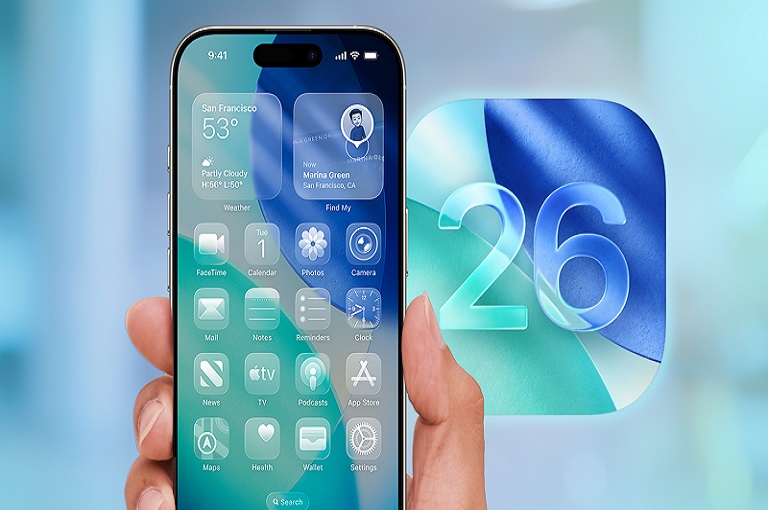
iOS 26 introduces a sleek, glass-like interface that makes icons and menus look more transparent. While many love the modern design, some users find it distracting or too flashy. Apple has quietly added an option to fix that.
How to Enable It
Go to Settings > Accessibility > Display & Text Size and toggle on Reduce Transparency. This instantly gives your iPhone a cleaner, more minimalistic look.
Why It’s Useful
- Reduces eye strain for users sensitive to bright or transparent visuals
- Makes the interface simpler and easier to read
- Can even help in slightly improving performance and battery life
With this option, Apple gives you full control to make your iPhone match your style.
Other Notable Hidden Features
While these five stand out, iOS 26 also comes with other hidden gems worth mentioning:
- Time to Charge: Displays how long it will take for your iPhone to reach a certain charge level.
- Lens Cleaning Reminder: Alerts you when your camera lens is dirty for sharper photos.
- Adaptive Wallpapers: Wallpapers that subtly move when you tilt your phone.
These small touches may not be headline features, but they add up to a smoother, more polished user experience.
Conclusion
iOS 26 is not just another software update — it’s a major leap forward in the iPhone experience. From smarter battery management to futuristic gesture controls, from 3D photos to effortless customization, Apple has designed features that are practical, fun, and game-changing.
Here’s a quick recap of the 5 hidden gems:
- Adaptive Power Mode – Smarter battery life
- Face Gesture Control – Hands-free iPhone experience
- Spatial Photos – Memories in 3D
- Custom Ringtones – Finally free from iTunes
- Reduce Transparency – A design that matches your style
These features show that Apple isn’t just focused on big flashy changes — it’s also improving the small details that make everyday use more enjoyable. If you haven’t updated to iOS 26 yet, now is the perfect time. Download it, explore these hidden features, and experience your iPhone in a completely new way.
About The Author