Delhi-NCR and North India Air Pollution: How to Check AQI on Google Maps
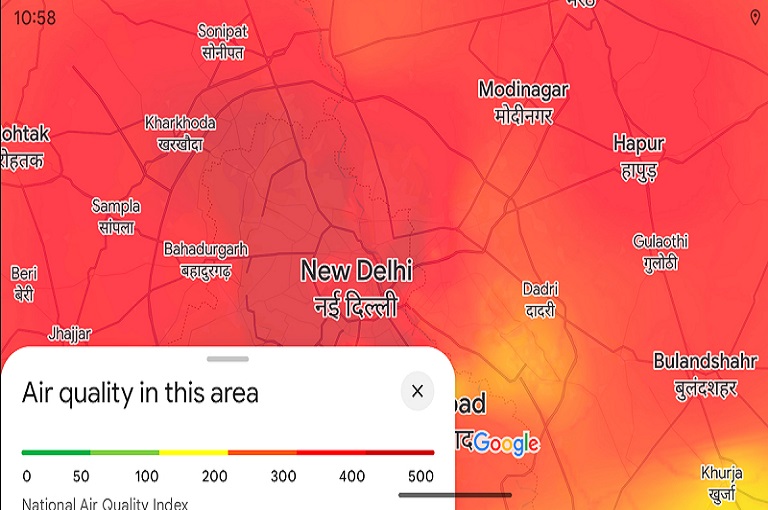
Air pollution in North India becomes especially severe during the winter months. In cities like Delhi-NCR, the quality of air often drops to hazardous levels, making it difficult to breathe and increasing the risk of health problems. During such times, it is crucial to stay informed about air quality to protect yourself and your family. Modern technology has made this easier than ever. Google Maps now offers an Air Quality Index (AQI) feature, allowing users to check the air quality in real time. This article explains in detail how you can use Google Maps to monitor AQI and stay safe.
The Severe Air Pollution Situation in Delhi-NCR and North India
During winter, air pollution in North India reaches alarming levels. The main causes include:
- Crop Burning: Stubble burning in states like Punjab and Haryana significantly increases air pollution in Delhi-NCR and surrounding areas.
- Traffic and Industrial Emissions: Smoke from vehicles and factories worsens the air quality in large cities.
- Temperature Inversions: Cold weather prevents air circulation, trapping pollutants close to the ground.
- Dust and Pollutants: Construction dust and household pollution also contribute to poor air quality.
As a result, many North Indian cities experience “severe” or “very poor” air quality. Going outside during this time can be risky for health. Therefore, checking air quality before stepping out is essential.
Google Maps: Air Quality Information in Your Hands
Google Maps is no longer just a navigation tool. It now includes an Air Quality Index (AQI) feature that shows the quality of air in real time for any city or locality.
Why Checking AQI Is Important
AQI tells you how polluted the air is. Based on the AQI, you can make informed decisions about outdoor activities:
- Green indicates healthy air, safe for breathing.
- Yellow or Orange indicates moderate pollution, requiring caution for sensitive groups.
- Red or Dark Red indicates hazardous air quality, and prolonged exposure can be harmful.
How to Check AQI on Google Maps
Whether you use a smartphone or a computer, checking AQI on Google Maps is simple.
On Mobile App
- Open Google Maps App
Make sure the app is updated to access the AQI feature. - Tap the Layers Icon
This icon appears on the top right corner of the screen. - Select Air Quality Option
The map will now display air quality in your city and nearby areas using color codes. - View AQI Details
Tap any location to see detailed information, including PM2.5, PM10, and AQI values.
On Desktop or Web
- Open Google Maps on your browser.
- Search for your city or area.
- Click the Layers or Map Details option on the bottom left.
- Select Air Quality.
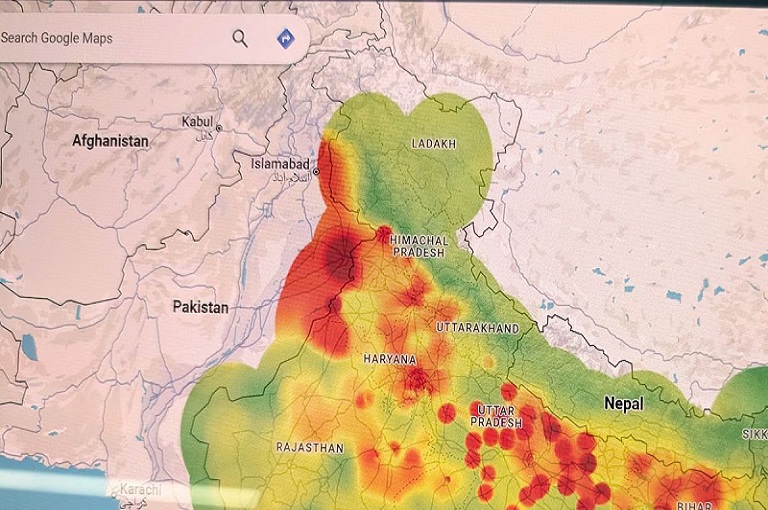
- Understand air quality based on the color-coded system on the map.
Understanding AQI Colors
Google Maps uses a color-coded system to help users quickly assess air quality:
- Green (Good): Air is healthy and safe for everyone.
- Yellow (Moderate): Air quality is acceptable, but sensitive groups should exercise caution.
- Orange (Unhealthy for Sensitive Groups): Children, elderly, and those with respiratory conditions may experience health effects.
- Red (Unhealthy): Prolonged outdoor exposure can be harmful for all.
- Dark Red/Purple (Very Unhealthy/Hazardous): Extremely harmful; avoid outdoor activities.
Winter Air Pollution: Key Precautions
In winter, air pollution rises due to crop burning, smog, and temperature inversions. It is important to take precautions:
- Check AQI Before Going Outside
Google Maps allows you to see real-time air quality to decide whether it is safe to step out. - Wear a Mask
If the AQI is high, wearing an N95 mask or equivalent is essential. - Maintain Indoor Air Quality
Use air purifiers and keep indoor spaces free of dust and smoke. - Exercise Carefully
Avoid outdoor workouts during high pollution periods as it can worsen health risks.
Benefits of Google Maps AQI Feature
- Real-Time Data: Check air quality instantly for any location.
- Detailed Information: Provides PM2.5, PM10, and AQI values.
- User-Friendly Interface: Color-coded system for easy understanding.
- Planning Outdoor Activities: Helps make safe decisions for trips or outdoor events.
Smart Planning Based on AQI
Monitoring AQI can help you make smart decisions:
- High AQI Days: Avoid going outside unless necessary.
- Moderate AQI Days: Sensitive people should take precautions.
- Low AQI Days: Safe for outdoor activities and exercise.
By checking AQI regularly, you can protect your health while managing your daily routine efficiently.
Conclusion
Air pollution in Delhi-NCR and North India is especially severe during winter. Google Maps’ Air Quality Index feature provides a simple, effective solution to monitor air quality in real time. It not only informs you about the air quality in your surroundings but also helps you make decisions to safeguard your health.
Checking AQI is now extremely easy. Simply open Google Maps, tap the layers icon, and select Air Quality. Use the color-coded system to understand the quality of air and take necessary precautions. By monitoring AQI and taking preventive measures, you can protect yourself and your family from serious health risks caused by air pollution.
Always wear a mask when stepping out during high pollution periods, stay informed about air quality, and prioritize your health. With the help of Google Maps, you can take smart steps towards a safe and healthy life.
About The Author